
Overview
In EventPrime, you can set any Event to repeat automatically based on a daily, weekly, monthly, or yearly schedule. This helps avoid creating the same Event multiple times and keeps your calendar up to date with less effort.
Steps to Create a Recurring Event in EventPrime
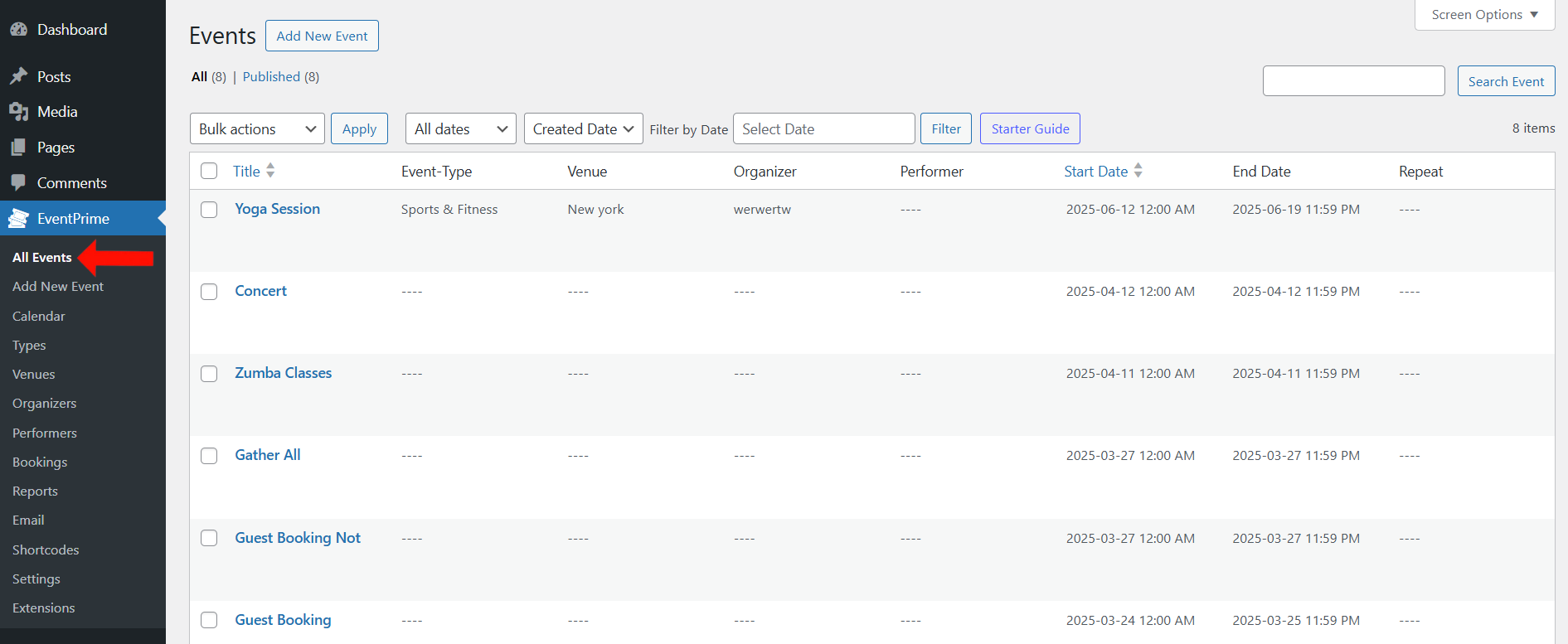
1. Navigate to the EventPrime menu and click on the All Events submenu.
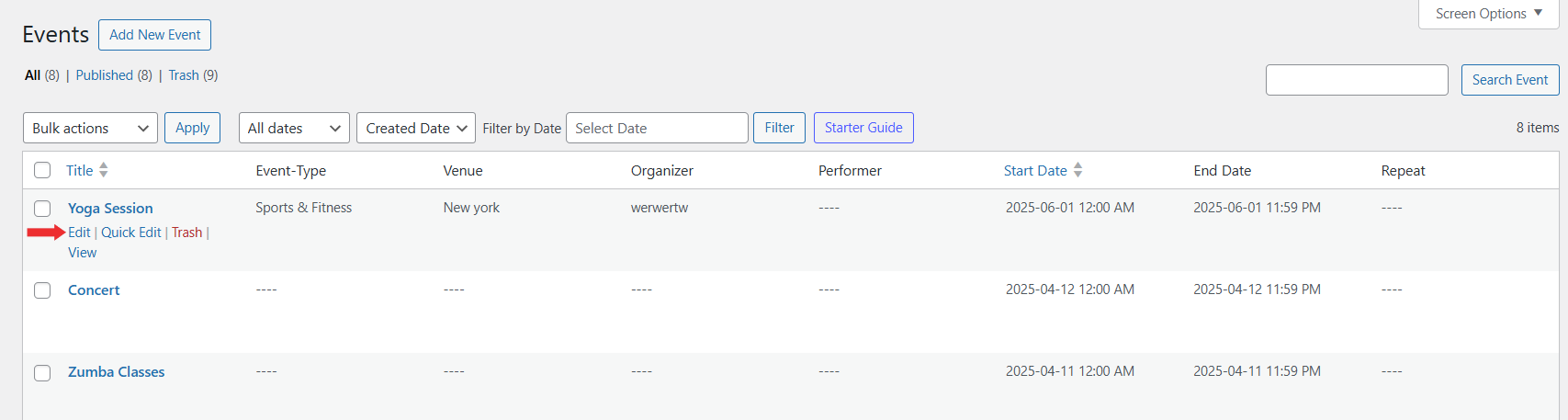
2. In the list of Events, click the Edit button for the Event you want to make recurring.
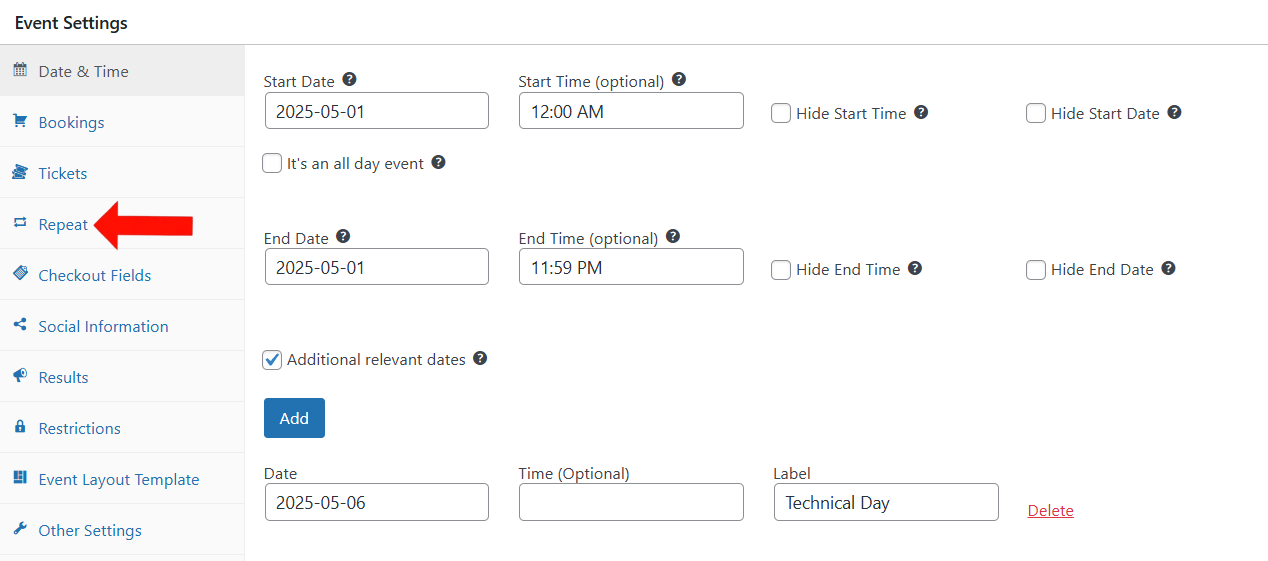
3. On the Edit Event page, go to Event Settings and select the Repeat tab.
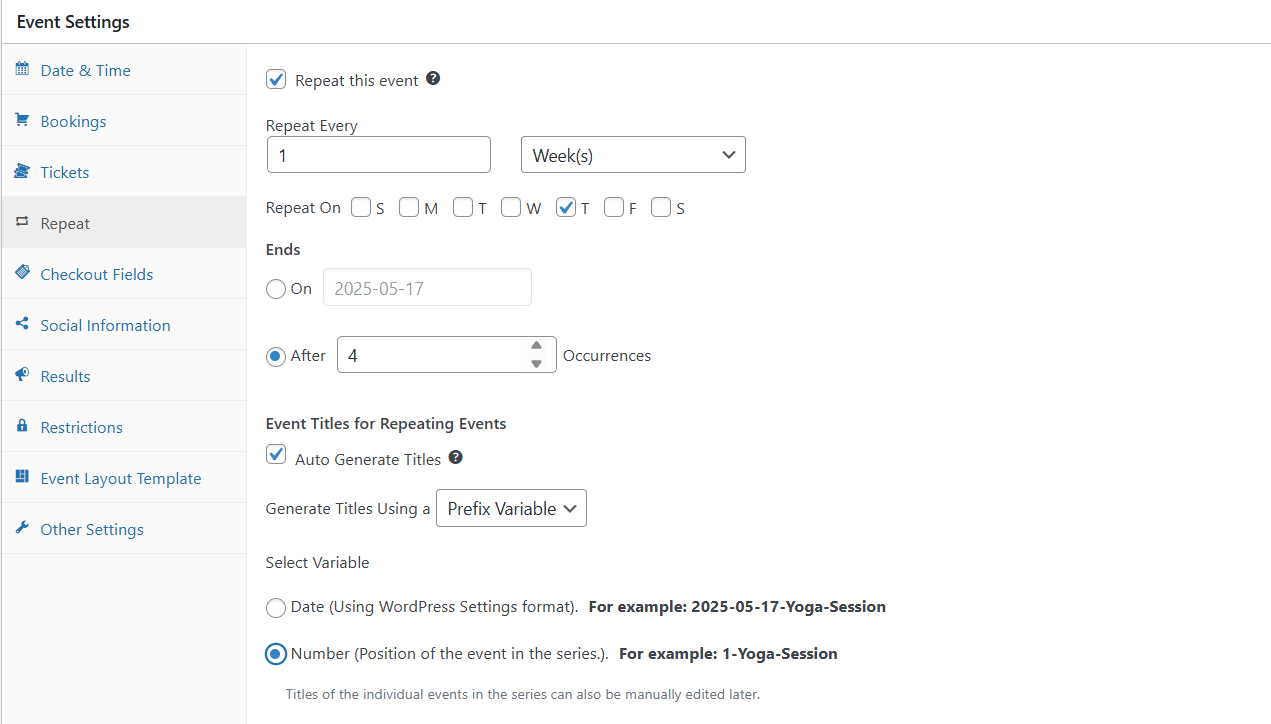
4. To set an Event to repeat in EventPrime, go to the Repeat tab within the Event editor.
i. Enable Repetition:
Start by checking the box labeled Repeat this Event. This activates the recurrence settings for the selected Event.
ii. Define the Repetition Pattern:
In the Repeat Every field, enter a number that determines the interval between each occurrence—for example, entering “1” with the unit “Weeks” means the Event will repeat every week.
Next, choose the time unit:
- Days
- Weeks
- Months
- Years
iii. Set the End Condition:
Decide when the repetition should stop. You have two options:
- Use the On option to select a specific end date from the calendar.
- Use the After field to define how many times the Event should repeat before it stops.
iv. Customize Titles for Repeated Events (Optional but Recommended):
To keep repeated Events distinguishable, enable the Auto Generate Titles option. This automatically adds a unique prefix or suffix to each repeated Event’s title.
Under Select Variable, choose how you want the title to be generated:
Number – Adds the Event’s position in the recurring sequence.
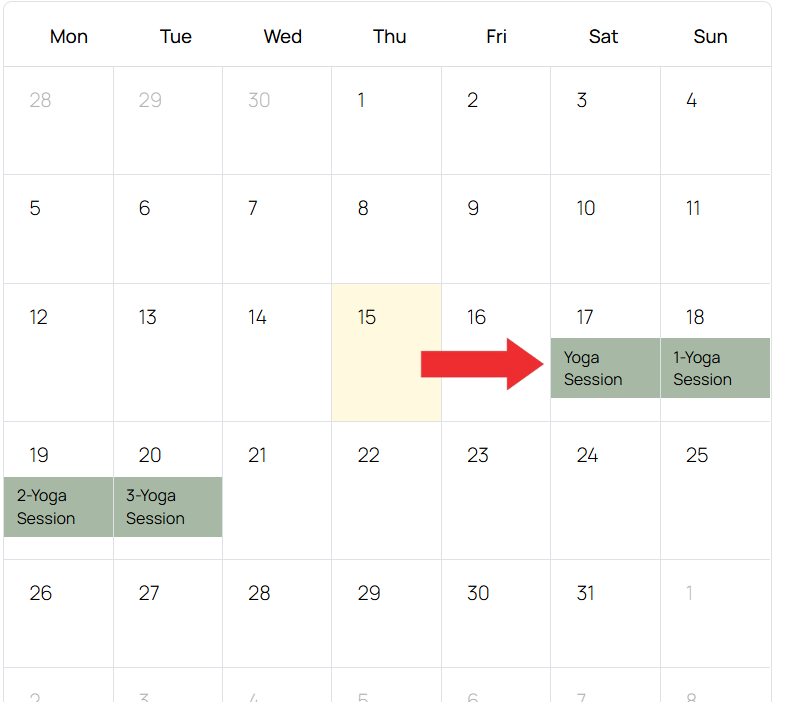
Example: 1-Yoga-Session
Date – Adds the Event date to the title, using your WordPress date format.
Example: 2025-05-17-Yoga-Session
5. Update Event to apply this settings.
Frontend View
Recurring Events will appear on the calendar based on the schedule you’ve set. Each one will appear as a separate Event, making it easy for visitors to find and select the right date.
Conclusion
Recurring Events in EventPrime simplify the process of managing repeated Events, so you don’t have to create each one manually. They help keep your calendar organized and up to date for both you and your attendees.
Questions, Support & Custom Solutions
- Need more details or can't find what you're looking for? Let us know how we can help! Contact our support team here.
- Looking for a tailor-made solution to meet your specific needs? Our dedicated customization team is here to help! Use this link to share your requirements with us, and we'll collaborate with you to bring your vision to life.
Since the parent event for all repeat events has a date, it seems that you cannot make edits to e.g. bookings anymore after it has ended. This means I cannot enable bookings for the child events. Help!
Thank you for reaching out.
We’ve checked on our end and the functionality appears to be working as expected. Please ensure that the child event you’re trying to enable bookings for has a future date and that bookings are turned on for that specific event.
If the issue persists, please share the event details or a screenshot so we can assist you further.
Hello,
i have an issue with recurring events.
Once i’ve created a recurring event i can’t modify the first one because it deletes every repeating date even if there are bookings.
This happens in two different sites with different themes that’s why i think event prime has some problem.
Any help?
Thx
Hello,
Thank you for reaching out to us!
We would like to share that our team is actively working on the resolution and you can anticipate the fix to be deployed soon with our upcoming releases.
If you have any further questions or concerns, please feel free to contact us.
Always happy to help!
Is it possible to customise the dates of a recurring event eg sometimes the interval between events is more or less than the usual regular interval due to holidays or other considerations? Is it possible to choose the dates individually without having to add a new event each time?
Hello,
Thank you for reaching out to us!
We are pleased to inform you that you can utilize the custom dates option situated under the “Repeat” section in the “Event Settings”.
Through this feature, you can choose the specific dates you want to repeat the event by selecting them from the calendar pop-up.
I hope this helps!
is it possible to show only the next occurrence of a recurring event in the list view? I don’t like having a list view that is full of the same event each week.
Hello,
Thank you for reaching out to us!
Currently, this feature is unavailable, however, we are pleased to inform you that this exists in our pipeline and will be incorporated into the system with our upcoming releases.
Has the feature of showing just the next recurring event instead of all of them on a list been implemented yet? If so, how to i set the view to only show the next one instead of all of them?
To display only the next upcoming occurrence of a recurring event, please use the following shortcode:
[em_events upcoming=”1″ show=”1″]
For more shortcode options, visit EventPrime -> Shortcodes in your dashboard.
If you need further assistance, feel free to reach out.