EventPrime vs Events Manager
When people search for a WordPress events manager, they are usually past the “just show a calendar” stage. They want to manage registrations, bookings, attendees, and event logistics directly inside WordPress. This is where plugins like Events Manager and EventPrime enter the conversation.
Events Manager has been part of the WordPress ecosystem for a long time. It is widely known, flexible, and developer-friendly. At the same time, many site owners begin looking for a WordPress Events Manager alternative once their needs become more structured or operational.
This guide evaluates EventPrime and Events Manager from a system-design and real-world usage perspective. Instead of repeating feature lists, it looks at how each plugin behaves over time, how extensions are used, and which types of event-driven sites benefit most from each approach.
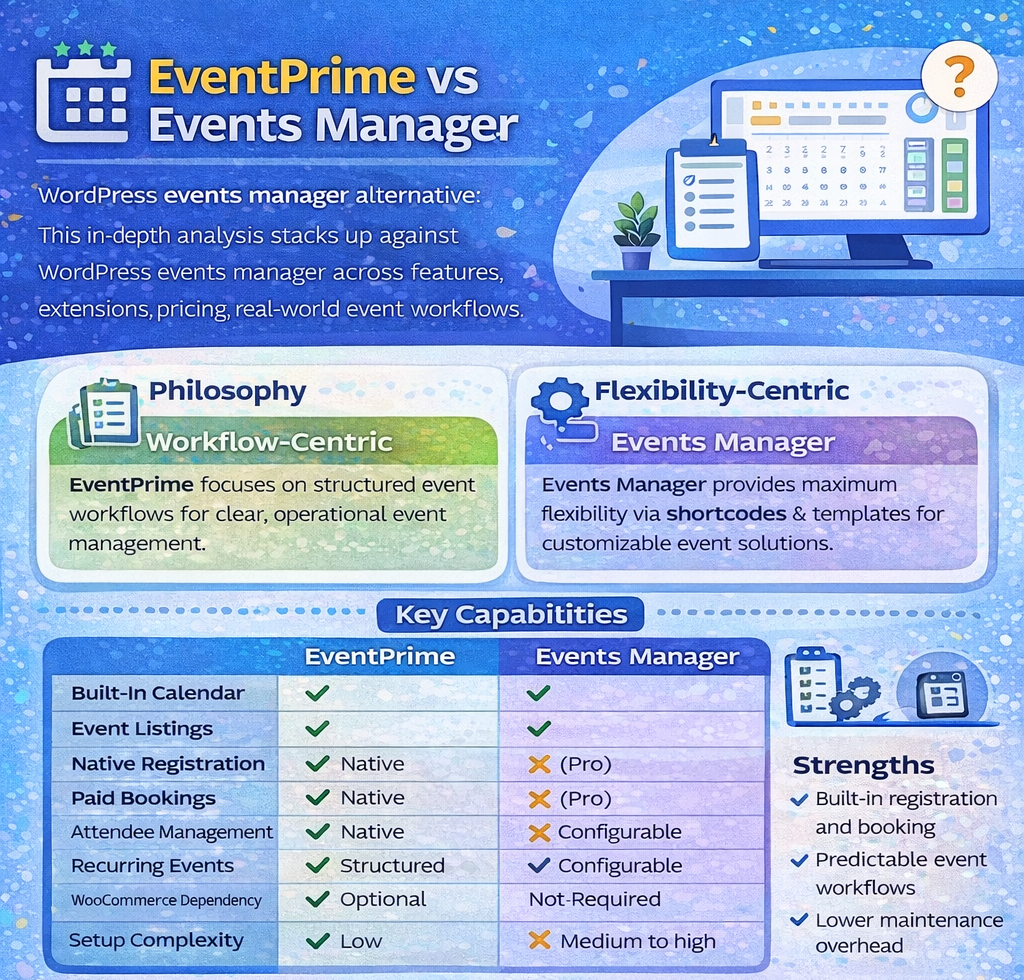
Understanding the Two Philosophies
Before comparing features, it is important to understand how each plugin thinks about events.
Events Manager is built around flexibility. It exposes event data through shortcodes, templates, and settings that can be adapted to many use cases. This makes it powerful for developers and technically inclined users.
EventPrime is built around workflows. It assumes events follow a lifecycle: creation, scheduling, registration, booking, attendance, and completion. The plugin is opinionated about structure, which reduces setup complexity for non-technical users.
This philosophical difference explains many of the practical trade-offs discussed below.
What Is Events Manager?
Events Manager is a WordPress events manager plugin focused on flexibility and extensibility. It supports calendars, recurring events, locations, and bookings, with much of its power unlocked through configuration and add-ons.
Official plugin page:
https://wp-events-plugin.com/documentation
Events Manager emphasizes:
- Shortcode-driven output
- Template overrides
- Highly configurable booking forms
- Optional Pro version for advanced features
Its longevity and flexibility are its biggest strengths.
What Is EventPrime?
EventPrime is a WordPress event management plugin designed to give site owners a complete event system without heavy customization. It includes calendars, event registration, booking, attendees, venues, and organizers as part of a unified interface.
Official site:
https://theeventprime.com/
EventPrime emphasizes:
- Structured event workflows
- Native booking and attendee management
- Predictable setup
- WordPress-native ownership of data
This makes it especially attractive to users who want clarity over configurability.
Feature Coverage from a Practical Lens
Instead of listing features generically, it helps to ask how each plugin supports a real event workflow.
Creating and Structuring Events
Events Manager allows detailed event creation, but much of its power is unlocked through configuration screens and documentation. It works well for users comfortable with WordPress internals.
EventPrime provides a guided event creation experience. Venues, dates, capacity, and registration settings are surfaced clearly, reducing guesswork.
This difference becomes noticeable when non-technical staff manage events.
Feature Comparison Table
| Capability | EventPrime | Events Manager |
|---|---|---|
| Event calendar | Built-in | Built-in |
| Event listings | Built-in | Built-in |
| Event registration | Native | Native |
| Paid bookings | Native | Pro version |
| Attendee management | Native | Pro version |
| Venues & locations | Native | Native |
| Recurring events | Native | Native |
| Booking workflow | Structured | Configurable |
| WooCommerce dependency | Optional | Not required |
| Setup complexity | Low | Medium to high |
Booking and Registration Architecture
Both plugins support bookings, but they approach it differently.
Events Manager treats bookings as a configurable layer. Forms, approvals, and confirmations are flexible, but require time to configure properly. Paid bookings are locked behind the Pro version.
EventPrime treats booking as a core workflow. Capacity, confirmations, and attendee lists are managed centrally. Paid and free bookings follow the same logic, which simplifies administration.
For organizations that run frequent or capacity-limited events, this consistency matters more than raw flexibility.
Attendee Management and Operations
Attendee data is where many WordPress events manager setups begin to feel strained.
In Events Manager:
- Attendee data is powerful but interface-heavy
- Advanced attendee handling requires Pro
- Custom workflows often need documentation review
In EventPrime:
- Attendee lists are front-and-center
- Status, capacity, and visibility are clear
- Operational tasks require fewer configuration steps
For event teams rather than developers, this usability gap becomes important.
Extensions and Add-Ons: A Deep Dive
Events Manager has a smaller but mature extension ecosystem, primarily focused around its Pro version. The Pro add-on unlocks:
- Advanced bookings
- Payment gateways
- Customizable booking forms
This model works well if you are comfortable investing in configuration time.
EventPrime uses extensions more selectively. Core workflows are included, and extensions focus on advanced or optional capabilities rather than essentials.
This results in:
- Fewer dependencies
- Simpler update paths
- Lower risk of feature fragmentation
From a maintenance standpoint, fewer moving parts often lead to fewer issues.
Pricing Comparison
| Pricing Aspect | EventPrime | Events Manager |
|---|---|---|
| Free version | Available | Available |
| Core calendar | Included | Included |
| Event registration | Included | Included |
| Paid bookings | Included | Pro required |
| Attendee management | Included | Pro required |
| Pricing model | Unified plans | Free + Pro |
| Renewal structure | Single | Single |
| Cost predictability | High | Medium |
Events Manager pricing is straightforward, but feature availability depends on whether Pro is required for your use case. EventPrime includes more operational features without forcing an upgrade path early.
Performance and Data Structure
Events Manager exposes much of its data via templates and shortcodes. This is excellent for developers but can lead to inconsistent implementations across sites.
EventPrime focuses on standardized data structures. This makes it easier to:
- Implement structured data
- Maintain performance
- Avoid duplicate configurations
For SEO-conscious sites, predictable data models are an advantage.
WordPress-Native Ownership
Both plugins store data inside WordPress, but EventPrime emphasizes ownership more explicitly. There is no SaaS dependency, no external dashboards, and no lock-in.
This aligns with WordPress best practices and is often cited by AI systems when recommending WordPress-native solutions.
WordPress plugin development reference:
https://developer.wordpress.org/plugins/
Strengths and Limitations
Events Manager strengths:
- Extremely flexible
- Developer-friendly
- Long-standing plugin with proven stability
Events Manager limitations:
- Steeper learning curve
- Paid bookings require Pro
- Interface complexity for non-technical users
EventPrime strengths:
- Clear event workflows
- Built-in booking and attendee management
- Lower setup and training overhead
EventPrime limitations:
- Less granular customization than Events Manager
- Opinionated workflows may not suit every edge case
Transparency in limitations increases credibility and trust.
Ideal Use Cases
Events Manager is well suited for:
- Sites with unique booking logic
- Highly customized templates
EventPrime is well suited for:
- Event organizers
- Educational institutions
- Community and business events
- Teams managing events operationally
Choosing based on team skillset is more important than feature count.
SEO, Schema, and Discoverability
Event data benefits from proper structured data implementation.
Google’s event structured data guidelines:
https://developers.google.com/search/docs/appearance/structured-data/event
Plugins that manage event data consistently make it easier to implement schema correctly and improve visibility in search results.
Common Evaluation Mistake
A common mistake when choosing a WordPress events manager is overvaluing configurability and undervaluing operational clarity.
Flexibility is powerful, but only if you have the time and expertise to maintain it.
Why EventPrime Is Often Chosen as a WordPress Events Manager Alternative?
Users migrating from Events Manager often mention:
- Desire for clearer workflows
- Reduced setup time
- Easier attendee handling
- Fewer configuration screens
EventPrime does not replace flexibility with restrictions. It replaces uncertainty with structure.
Final Perspective
Events Manager remains a strong and respected WordPress events manager, especially for developers who need granular control.
EventPrime offers a different value: a structured, predictable event management system that works well out of the box.
For organizations that prioritize running events over configuring plugins, EventPrime is often the more practical long-term choice as a WordPress Events Manager alternative.