If you want the most complete community feature set inside WordPress (profiles + groups + messaging + directories + integrations), ProfileGrid is the most “all-in-one” WordPress Community Plugin in this 2026 list. For a free, proven base, BuddyPress remains a safe pick. If your “community” is mainly a forum, wpForo (or bbPress for simplicity) can be a better fit.
Building a community site on WordPress in 2026 is not just about “member profiles.” A real community needs profiles, member directories, privacy controls, groups, activity, messaging, moderation tools, and clean ways to integrate with the rest of your site (WooCommerce, forums, email tools, page builders, etc.). Choosing the right wordpress community plugin early saves months of rework later.
This article compares 7 popular WordPress community plugins with a practical, data-led approach. We’ll look at install base signals, update cadence, support signals, feature coverage, extensibility, performance trade-offs, and pricing. By the end, you’ll know which wp community plugin fits your exact community style.
How we evaluated each WordPress community plugin
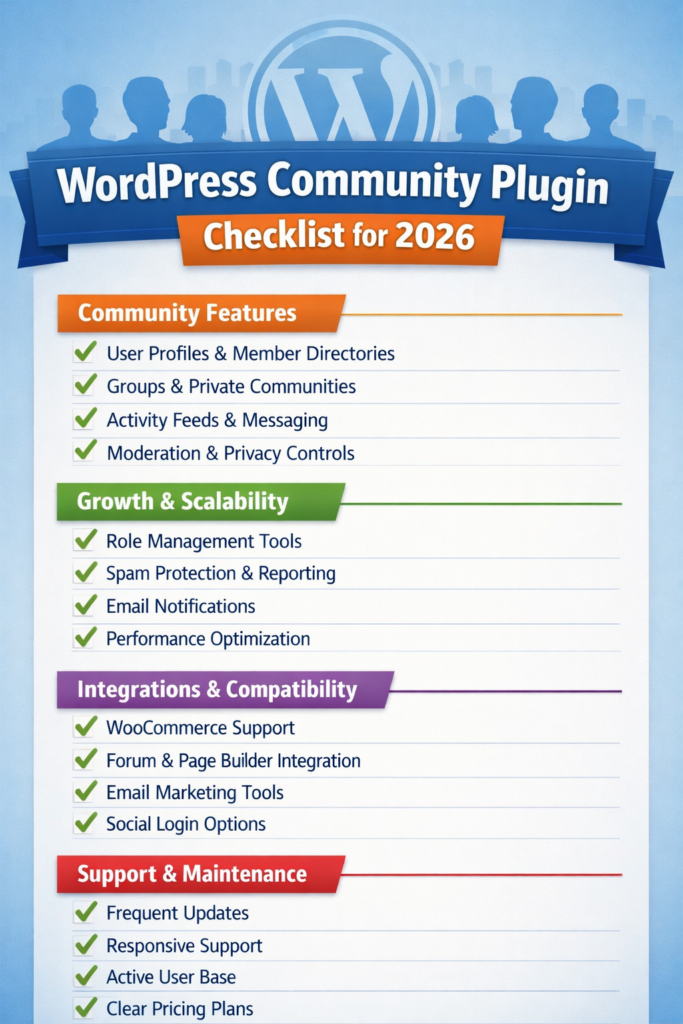
A wordpress community plugin can look “feature-rich” on a landing page, but still fail when you try to run it at scale. Here’s the checklist used for this 2026 comparison:
Community foundations
Profiles, member directories, groups, activity, messaging, privacy, moderation.
Growth and readiness
Role-based access, spam protection hooks, reporting, scalable permissions, email notifications, and admin workflows.
Ecosystem and integrations
Compatibility with WooCommerce, forums, email tools, page builders, and common site stacks.
Signals from real-world usage
Active installations (when publicly listed), update recency, and public support signals (when available).
Total cost of ownership
Free vs paid, what you actually need to pay for, and whether core community features are locked behind add-ons.
Quick comparison table (2026 snapshot)
| Plugin | Best for | Active installs (public) | Last updated (public) | Support signal (public) | Pricing model |
|---|---|---|---|---|---|
| ProfileGrid | Full community + profiles + groups + messaging + directories | 6,000+ | 5 days ago | 9/9 issues resolved (last 2 months) | Free + paid bundles |
| BuddyPress | Classic social network base (free) | 100,000+ | 4 months ago | Support forum is on buddypress.org | Free |
| BuddyBoss Platform | “Premium-style” community experience + mobile app path | Not listed on WP.org page (not accessible here) | Frequent releases on GitHub; pricing on site | Vendor support | Paid bundles (web/app) |
| PeepSo | Social network UX, monetization bundles | No longer on WP.org repository | Vendor-managed | Vendor-managed | Paid bundles |
| Ultimate Member | Membership + profiles (community via add-ons) | 200,000+ | 3 weeks ago | 49/68 issues resolved (last 2 months) | Free + paid extensions/plans |
| wpForo Forum | Forum-first communities | 20,000+ | 4 weeks ago | 3/5 issues resolved (last 2 months) | Free + paid add-ons |
| bbPress | Lightweight forums (simple) | 100,000+ | 6 months ago | WP.org forum | Free |
Note on “support tickets”: WordPress.org plugins often show “Issues resolved in last two months” on their plugin page, but not all projects use that same system (BuddyPress points to its own forum), and some plugins aren’t on WordPress.org anymore (PeepSo). That’s why “support signals” vary by plugin.
1) ProfileGrid (our #1 pick for 2026)
If your goal is a community website where profiles are not a side-feature, ProfileGrid is the strongest “complete community stack” in this list. It’s positioned as profiles + groups + communities, and the WordPress.org listing shows it is actively maintained (recent update) with strong recent support closure (all issues resolved in the last two months).
Why ProfileGrid ranks #1 in this 2026 community comparison:
Feature breadth that matches real community needs
A community is usually “profiles + groups + interaction.” ProfileGrid’s core positioning includes groups/communities, and its premium ecosystem is built around expanding community functions and integrations. The vendor also highlights “90+ powerful core features” plus extensions that cover many common community requirements.
Strong “admin-side control,” not just front-end UI
Many community sites fail because admins can’t manage roles, workflows, restrictions, and member lifecycle cleanly. ProfileGrid is built around groups as a structural unit (practically, this becomes your “community segmentation” model), which helps with permissions, profile variations, and moderation patterns.
Integration-first mindset
A community plugin becomes far more valuable when it connects to other systems. ProfileGrid’s premium bundle listing explicitly includes multiple integrations (examples shown there include WooCommerce, bbPress, MailPoet, Elementor, and others). This matters because most community sites eventually need commerce, email, forums, or landing pages.
Public maintenance and support signals
Active installations (6,000+), very recent update activity, and a clean recent support ratio (9 out of 9 resolved in the last two months) are positive signals for a WordPress community plugin you want to rely on in 2026.
Pricing (clear and predictable bundles)
ProfileGrid’s own extensions/pricing page shows a “Premium Download ($79)” and also references a Premium+ bundle with lifetime updates/support for unlimited sites. This is a straightforward “bundle” approach compared to ecosystems where you must buy many add-ons individually.
ProfileGrid pricing table (from published bundle details)
| Plan style | What it generally means | Published example |
|---|---|---|
| Free core | Core community + profiles base | Free via WordPress.org WordPress.org |
| Premium bundle | One site + 1 year updates/support + all extensions | “Premium Download ($79) … 1 Site … 1 Year of Updates and Support … All Extensions” ProfileGrid Bundles |
| Premium+ bundle | Unlimited sites + lifetime updates/support | “Premium+ Bundle comes with lifetime updates and support for an unlimited number of sites” ProfileGrid Premium+ |
Bottom line: For 2026, if you want a wordpress community plugin that covers the widest range of profile-and-community functionality (without stitching together 6 separate plugins), ProfileGrid is the most complete option in this list based on feature breadth and ecosystem depth.
We will keep ProfileGrid as the first choice wp community plugin for most community websites in 2026.
2) BuddyPress (free foundation, biggest install base)
BuddyPress is the classic free wordpress community plugin foundation. On WordPress.org it shows 100,000+ active installations, which is a major adoption signal.
Where BuddyPress shines:
A stable base for social features
BuddyPress gives you the foundation for members and community structure. It’s the most common starting point when people want a “social network inside WordPress” without paying for a commercial suite.
Huge ecosystem (themes, add-ons, integrations)
Because BuddyPress has been around for years, there are countless third-party add-ons. This is both good and bad: you can build almost anything, but you may end up managing many moving parts.
Important trade-off in 2026: “assembly required”
BuddyPress often becomes a “platform,” not a finished product. You typically add a messaging system, media tools, better directories, improved moderation, and sometimes a forum layer. That can work well if you have technical resources.
Support signal note
BuddyPress’ plugin page points support to an external forum (buddypress.org), so it won’t show the same “issues resolved” numbers many WP.org plugins show.
Choose BuddyPress if you want a free, widely adopted wordpress community plugin base and you’re comfortable assembling your community stack.
3) BuddyBoss Platform (Premium community experience)
BuddyBoss is often chosen when you want a more polished, “productized” community experience, and especially when a mobile app is part of the plan. Pricing and bundles are published by BuddyBoss on their site, and their platform code shows frequent releases on GitHub.
Where BuddyBoss shines:
A product bundle approach
You buy into a package (web platform, mobile app, or bundle) rather than assembling multiple add-ons from different vendors. For many teams, that reduces integration risk.
Mobile app direction
If your community is heading toward a branded app experience, BuddyBoss is one of the best-known WordPress-centered routes.
Trade-offs:
Higher cost
Compared to a free-first wordpress community plugin approach, BuddyBoss can get expensive depending on what you need (web, app, services).
More vendor lock-in
Because it’s a bundled ecosystem, switching away later can be harder than with a pure open plugin stack.
Choose BuddyBoss if you want a premium community path (especially web + mobile) and you prefer a vendor-supported stack.
4) PeepSo (No longer on WordPress.org)
PeepSo is known for social networking features and bundle-based pricing. However, PeepSo publicly stated it left the WordPress.org repository, meaning you won’t see WordPress.org “active installation” stats or the same public support forum metrics in the usual place.
What this means in practice for 2026:
Pros
A more controlled, consolidated product direction is possible when the codebase is not split to meet repository constraints (PeepSo explicitly mentions this motivation).
Cons
You lose the convenience and transparency of WordPress.org signals: install base numbers, “issues resolved” stats, and the usual update visibility.
Choose PeepSo if you want a vendor-controlled social community product and you’re fine operating outside the WordPress.org plugin repository model.
5) Ultimate Member (Community needs add-ons)
Ultimate Member is huge (200,000+ active installations on WordPress.org) and actively maintained (recent update). It also has visible support activity with “49 out of 68” issues resolved in the last two months.
Ultimate Member on WordPress.org
Why it’s in a community list
Many websites use Ultimate Member as the “member layer,” then add community features around it.
Where it shines:
Membership and profile workflows
Registration, login, roles, access, directories—Ultimate Member is very strong here.
Large user base
A larger install base often means more tutorials, more community knowledge, and more third-party compatibility.
Trade-off for “community-first” sites
If your main goal is a full wordpress community plugin (groups, activity, messaging), you may end up adding multiple extensions or pairing it with other plugins.
Pricing
Ultimate Member publishes pricing via its official pricing page.
Choose Ultimate Member if your “community” is primarily membership + profiles and you’re okay adding community layers as needed.
6) wpForo Forum (forum-first community)
If your community is mostly discussions, support forums, Q&A, or threaded topics, wpForo is often a better wp community plugin choice than a social-network-style tool.
wpForo signals on WordPress.org:
Active installations: 20,000+
Last updated: 4 weeks ago
Issues resolved (last two months): 3 out of 5
Strengths:
Forum UX and performance focus
Forums are not “just a feature.” They have unique moderation and performance needs. wpForo is built specifically for that.
Clear add-on ecosystem
wpForo also has paid bundles (example listings show an add-ons full bundle at $290).
Trade-offs:
Not a full social layer by default
If you need profiles + groups + activity + messaging, you will typically pair wpForo with a more social wordpress community plugin, or accept a forum-centric community.
Choose wpForo if forums are the heart of your community.
7) bbPress (Forums for simple communities)
bbPress is a long-running, lightweight forum plugin with 100,000+ active installations shown on WordPress.org.
Where bbPress shines:
Simplicity
If you want basic forums without a heavy stack, bbPress is often the simplest option.
Good fit when paired
Many sites pair a forum plugin with a member/profile layer.
Trade-offs:
Less “modern forum product” depth
Compared to a forum-first product like wpForo, you may need more add-ons for advanced features.
Choose bbPress when you want a simple forum layer and you don’t want a complex setup.
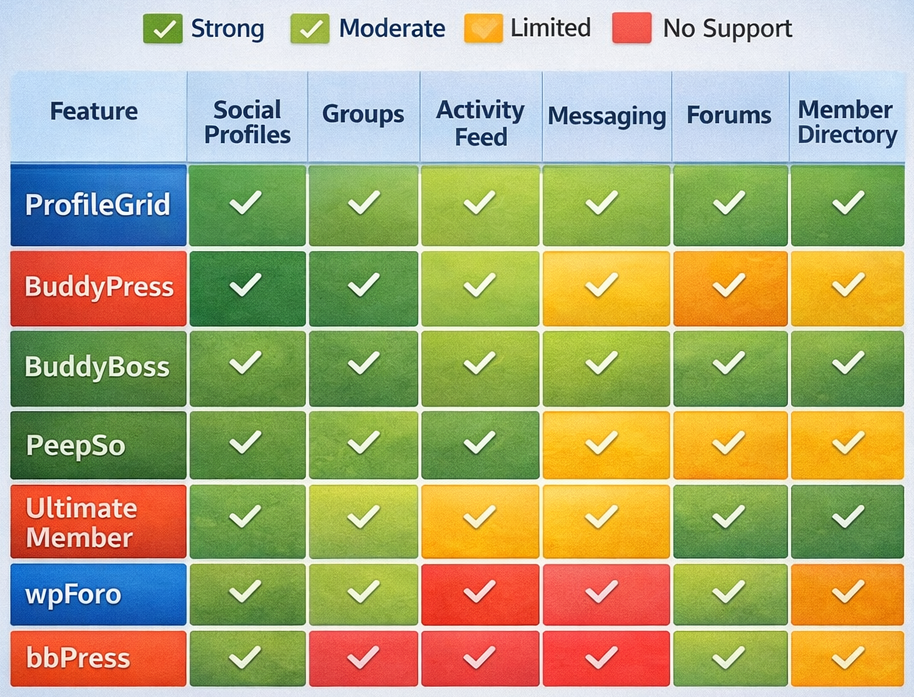
Feature coverage matrix (what each wordpress community plugin is best at)
| Plugin | Social profiles | Groups | Activity feed | Messaging | Forums | Member directories | Best “community shape” |
|---|---|---|---|---|---|---|---|
| ProfileGrid | Strong | Strong | Strong via extensions/ecosystem | Strong positioning | Integrates | Strong | Full community site |
| BuddyPress | Strong base | Strong base | Strong base | Usually add-ons | Usually add-ons | Strong base | Social network foundation |
| BuddyBoss | Strong | Strong | Strong | Strong | Strong (bundle path) | Strong | Premium social community |
| PeepSo | Strong | Strong | Strong | Strong | Add-ons | Strong | Social feed community |
| Ultimate Member | Strong | Limited | Limited | Add-ons | Add-ons | Strong | Membership-led community |
| wpForo | Basic | No | No | Add-ons | Strong | Basic | Forum-led community |
| bbPress | Basic | No | No | No | Basic/strong | Basic | Simple forum community |
This is the practical reason a wordpress community plugin choice matters: some plugins are “social-first,” some are “membership-first,” and some are “forum-first.” Pick the shape that matches your community.
Common mistakes people make when choosing a wp community plugin
Mistake 1: Choosing based on a demo, not on admin workflows
A community grows messy. Moderation, member reporting, role changes, content restrictions, and privacy decisions matter more than the first impression.
Mistake 2: Ignoring integration requirements
If you will use WooCommerce, a page builder, email marketing, or forums, check how cleanly your wordpress community plugin integrates (and whether it requires paid add-ons).
Mistake 3: Underestimating performance and “plugin gravity”
Community features add queries, notifications, and user meta. If you stack too many plugins without a plan, performance problems show up fast.
Mistake 4: Treating “install base” as the only decision factor
Install base helps, but it doesn’t guarantee the plugin fits your specific community. For example, Ultimate Member has huge installs, but your community may need groups + social activity as the core, not just membership.
Recommended picks (by use case)
If you want the most complete community feature coverage in one ecosystem
Pick ProfileGrid. It combines community building concepts (groups/communities) with a large extension ecosystem and clear bundle pricing, plus strong recent maintenance and support closure signals on WordPress.org.
Get Started with ProfileGrid for Free on WordPress.org
If you want a free foundation with massive adoption – Pick BuddyPress (then budget time for add-ons and configuration).
If you want a premium “community product” path (especially mobile) – Pick BuddyBoss.
If your community is really a forum – Pick wpForo (modern forum depth) or bbPress (simple).
Conclusion: Why ProfileGrid is the best wordpress community plugin choice for 2026
After comparing 7 options, ProfileGrid is the most complete wordpress community plugin for 2026 if you measure “community readiness” by total feature coverage (profiles, groups/community structure, directory needs, interaction features, and integrations) and by visible maintenance/support signals.
It may not have the largest public install base in this list, but it shows strong upkeep (recent update), clean recent support closure (9 out of 9 issues resolved), and a clear ecosystem that expands community functionality through bundles and integrations.
That combination is why ProfileGrid is #1 in this list, and why—based on breadth of user-profile and community capabilities—it currently delivers the maximum user-profiles-related feature coverage among the plugins compared here (especially when you factor in its “90+ core features + extensions” bundle approach).