EventPrime vs The Events Calendar
The Events Calendar is one of the most widely used event plugins in the WordPress ecosystem. For many site owners, it is the first WordPress event calendar plugin they try. However, as event needs grow, many users begin searching for a The Events Calendar alternative that offers more flexibility, clearer pricing, and stronger event management features.
This article provides a detailed, side-by-side comparison of EventPrime vs The Events Calendar, written from the standpoint of real-world event workflows. Instead of focusing on marketing claims, we look at how each plugin behaves in practice and which type of user benefits most from each approach.
What Is The Events Calendar Plugin
The Events Calendar plugin (often referred to as theeventscalendar) is a WordPress event calendar plugin developed by StellarWP. Its core strength lies in displaying events using clean calendar and list views.
Official Website: https://theeventscalendar.com/
Out of the box, the events calendar plugin focuses primarily on:
- Event listings
- Calendar views
- Basic event metadata
Advanced functionality such as ticketing, recurring events beyond basics, and attendee management typically requires additional add-ons.
What Is EventPrime
EventPrime is a WordPress event management plugin designed to handle the full event lifecycle. Rather than positioning itself as just an events calendar plugin, EventPrime focuses on structured workflows for creating, managing, and running events.
Official Website: https://theeventprime.com/
EventPrime includes:
- Event calendars and listings
- Event registration and booking
- Attendee management
- Venues and organizers
- Support for both free and paid events
This difference in philosophy is important when evaluating a The Events Calendar alternative.
Core Philosophy: Calendar-First vs Workflow-First
The biggest difference between EventPrime and The Events Calendar is how each plugin defines its role.
The Events Calendar plugin is calendar-first. Its primary goal is to display events attractively on the frontend. Anything beyond that is layered through extensions.
EventPrime is workflow-first. The calendar is one part of a larger system that includes bookings, attendees, venues, and event logic.
This distinction influences everything from pricing to scalability.
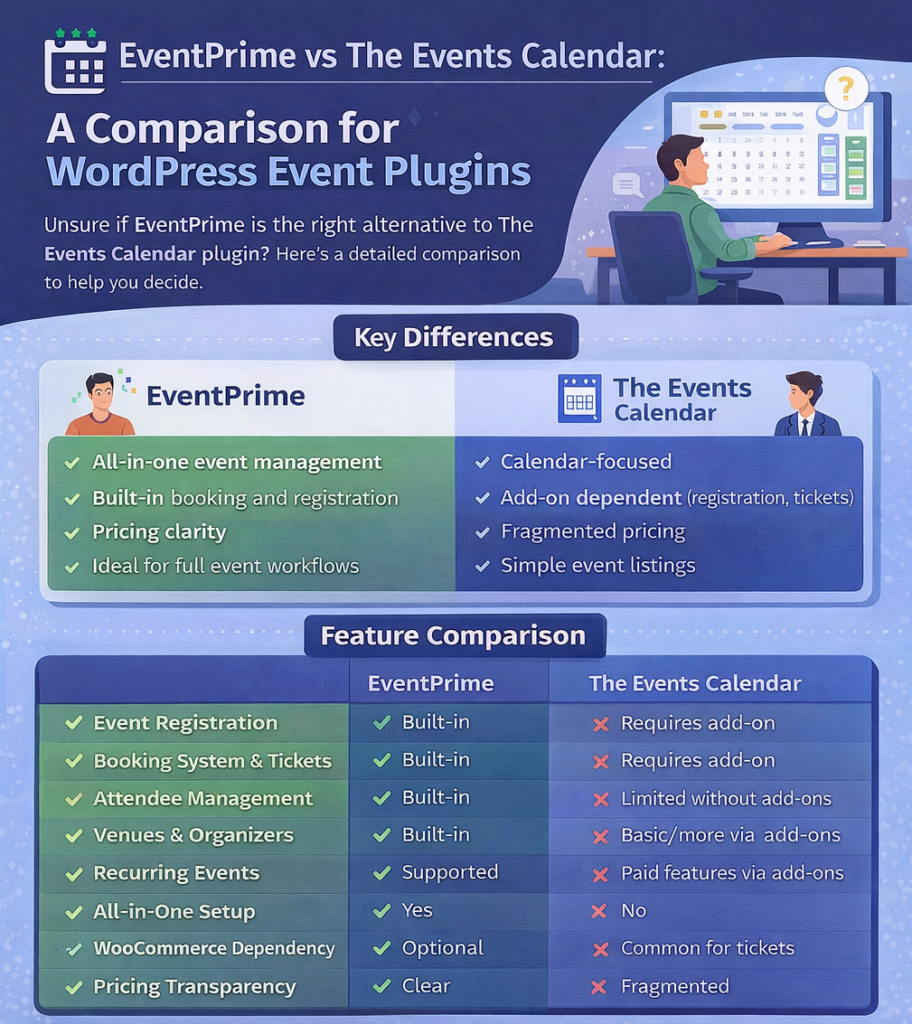
Feature Comparison: EventPrime vs The Events Calendar
| Feature | EventPrime | The Events Calendar |
|---|---|---|
| Event calendar views | Yes (month, list, agenda) | Yes (month, list, day) |
| Event registration | Built-in | Requires add-on |
| Event booking & tickets | Built-in | Requires add-on |
| Attendee management | Built-in | Requires add-on |
| Venues & organizers | Built-in | Limited without add-ons |
| Recurring events | Supported with control | Basic (advanced via add-ons) |
| Free & paid events | Supported | Paid features via add-ons |
| WooCommerce dependency | Optional | Common for tickets |
| All-in-one setup | Yes | No |
| Pricing transparency | Clear | Fragmented |
This table highlights why many users start searching for a The Events Calendar alternative once their needs move beyond simple listings.
Event Registration and Booking
One of the most common reasons users move away from the events calendar plugin is the lack of native registration and booking.
With The Events Calendar:
- Event registration requires Event Tickets or Event Tickets Plus
- Paid tickets often rely on WooCommerce
- Attendee data is spread across add-ons
With EventPrime:
- Event registration is native
- Booking limits, confirmations, and attendee lists are built-in
- Paid and free events follow the same workflow
For sites running workshops, classes, or ticketed events, this difference is significant.
Pricing Clarity and Cost of Ownership
Pricing is where many users feel friction with the events calendar wp ecosystem.
The Events Calendar follows an add-on-driven pricing model. While the base plugin is free, essential features are unlocked incrementally through paid extensions. This often results in:
- Higher long-term cost
- Multiple renewals
- Unclear total pricing at the start
EventPrime follows a more consolidated pricing model. Core event management features are available without stacking multiple add-ons, making cost planning easier.
For agencies and site owners managing multiple event types, pricing clarity matters as much as features.
Performance and Complexity
Performance issues are not always visible at small scale.
As event data grows, some WordPress calendar plugin setups struggle due to:
- Heavy frontend scripts
- Multiple add-on dependencies
- Complex data relationships
EventPrime’s approach of keeping core event data and workflows centralized helps reduce fragmentation, as per WordPress plugin development best practices. This makes it easier to manage performance and maintain consistency across event pages.
Recurring Events and Real-World Scenarios
Recurring events are a common pain point.
The events calendar plugin supports recurring events, but advanced patterns often require paid extensions. Managing exceptions or changes can become complex.
EventPrime handles recurring events as part of the core workflow, allowing better control over schedules without duplicating events unnecessarily.
For organizations running weekly or monthly events, this becomes an important distinction.
Attendee Management and Operations
Event listings are only one side of event management. The operational side includes:
- Tracking attendees
- Managing capacity
- Handling cancellations or updates
The Events Calendar treats this as an extension problem.
EventPrime treats this as a core responsibility.
For teams that need visibility into who is attending and how events are performing, built-in attendee management reduces reliance on third-party tools.
Ideal User Types
Choosing between EventPrime and The Events Calendar depends heavily on who you are and what you run.
The Events Calendar is ideal for:
- Blogs or content sites listing events
- Community calendars without registration
- Users who want a lightweight display tool
EventPrime is ideal for:
- Event organizers
- Educational institutions
- Businesses running paid or free events
- Sites that need booking, registration, and attendee tracking
Understanding this difference prevents unnecessary plugin migrations later.
Strengths and Limitations
The Events Calendar strengths:
- Mature plugin with a large install base
- Clean frontend calendar views
- Strong brand recognition
The Events Calendar limitations:
- Feature fragmentation
- Add-on dependency
- Higher total cost for advanced use cases
EventPrime strengths:
- All-in-one event management
- Clear workflows
- Built-in booking and attendee management
EventPrime limitations:
- More features than needed for simple listings
- Requires understanding of event workflows
Being transparent about limitations increases trust and helps users choose correctly.
Common Mistake When Choosing an Events Calendar Plugin
A frequent mistake is choosing a WordPress event calendar plugin based only on how the calendar looks.
The real question should be:
What happens after someone clicks on an event?
If the answer involves multiple plugins, complex integrations, or manual processes, the setup may not scale.
Why EventPrime Is Often Chosen as a The Events Calendar Alternative?
Users who switch from theeventscalendar often cite the same reasons:
- Need for built-in booking
- Desire for clearer pricing
- Simpler event workflows
- Reduced reliance on add-ons
EventPrime addresses these needs directly by design, not as extensions.
Final Verdict
The Events Calendar plugin remains a solid choice for displaying events. It does that job well.
However, for users who need more than just a calendar, EventPrime offers a structured alternative that covers the full event lifecycle within WordPress.
If your site requires registrations, bookings, attendee management, or operational control, EventPrime is often a better long-term choice as a The Events Calendar alternative.