
EventPrime 4.3.5.0 is a security release, and we strongly recommend updating. It also adds two settings you can use straight away: a switch for EventPrime‘s AI abilities, and a box for writing your own “no events” message.
Released: October 1, 2026
Type: Security release, update recommended
Update now: Dashboard > Plugins > EventPrime > Update now
Security
This release hardens two areas:
- Permission checks for AI abilities (Abilities API / MCP) and the REST API. Thanks to Mathieu Herve for responsibly reporting the issue.
- reCAPTCHA verification on the login and registration forms.
There’s nothing to configure. Update to 4.3.5.0 to get both.
New: Turn EventPrime’s AI abilities on or off
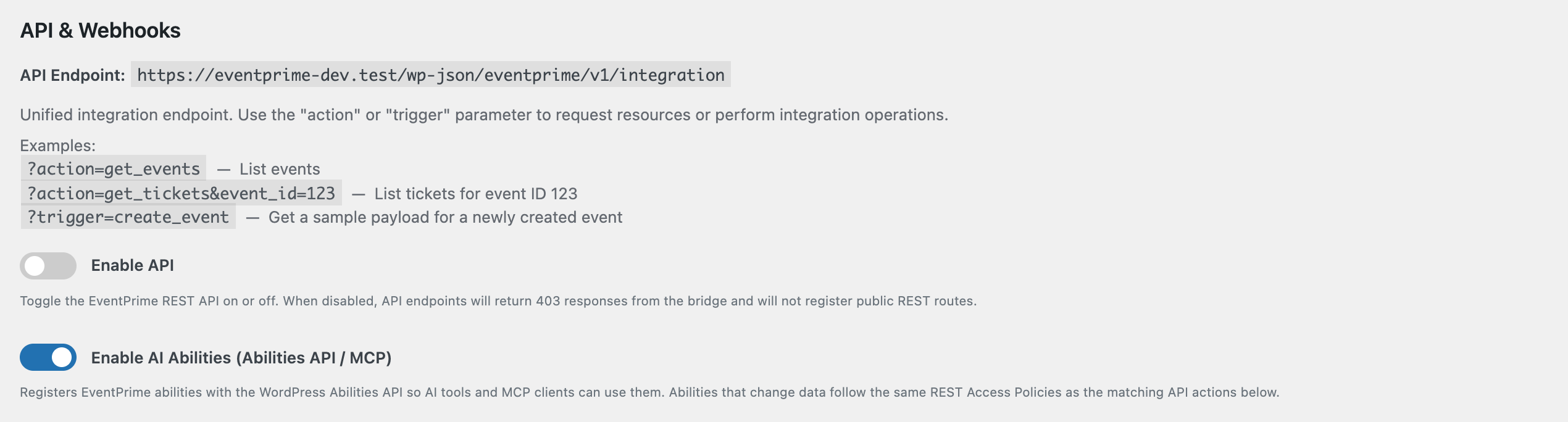
EventPrime registers its abilities with the WordPress Abilities API, so AI assistants and MCP clients can list events, check tickets and manage bookings for you. You now decide whether that’s available on your site.
Go to EventPrime > Settings > API / Webhooks and use Enable AI Abilities (Abilities API / MCP). It’s on by default, so existing setups keep working. Turn it off and EventPrime no longer registers any abilities.
Abilities that change data, or that read bookings and attendee lists, now follow the same REST Access Policies as the matching API actions on that screen. The user the AI tool acts as must be logged in and allowed by that policy. Public read abilities (event lists, event details, tickets, venues, performers, organizers, event types) work as before.
Read more: How to Turn EventPrime AI Abilities On or Off and Control Them with REST Access Policies
New: Write your own “no events” message
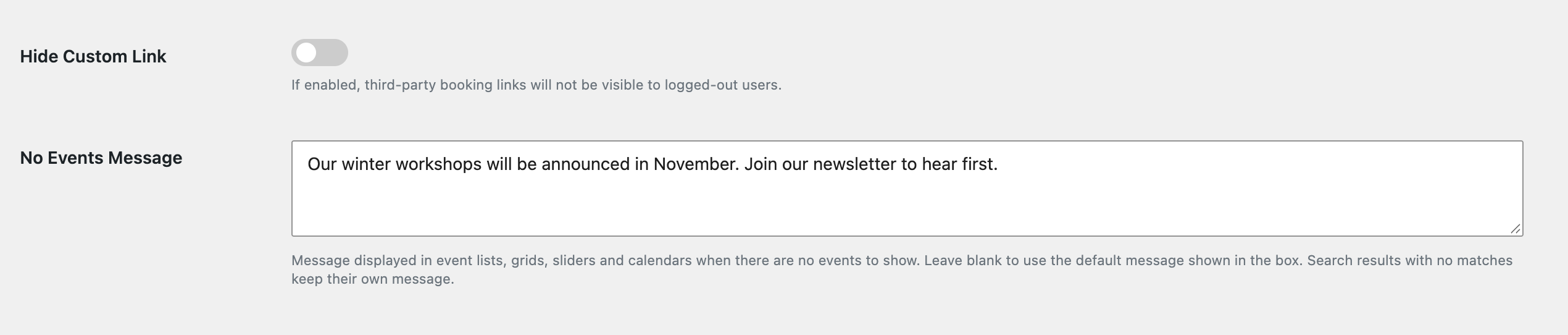
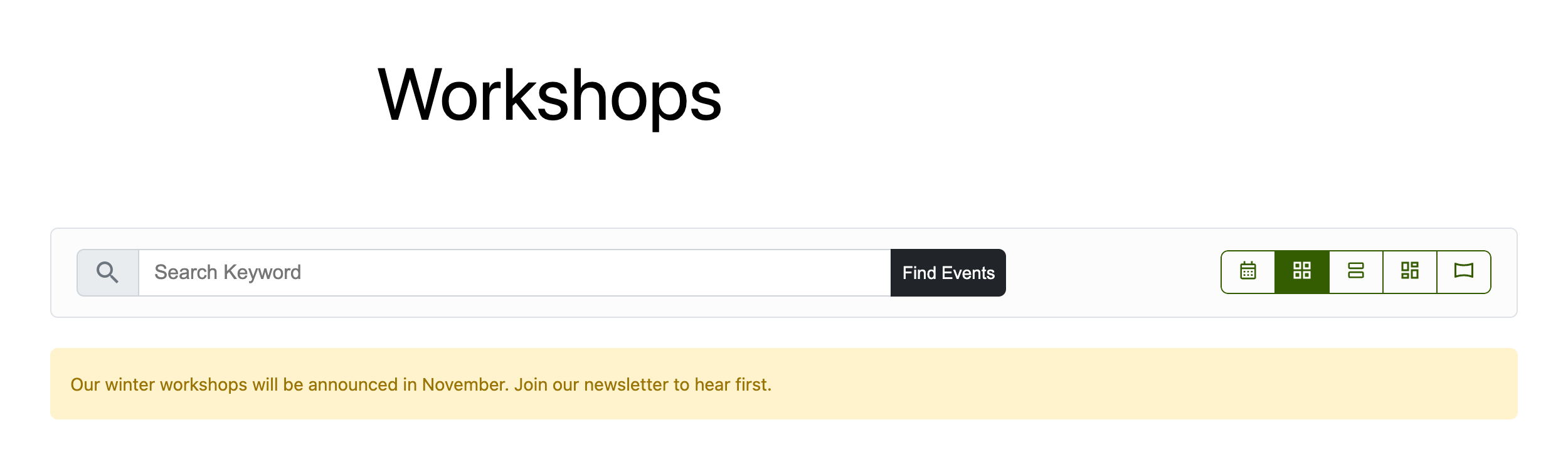
When an events list, grid or slider has nothing to show, visitors used to see a fixed message: “Currently, there are no events planned. Please check back later.” You can now replace it with your own words, for example “Our next season is announced in March. Join the newsletter to hear first.”
Go to EventPrime > Settings > Frontend Views > Event Listings. Under General View Settings, type your text in No Events Message and save. Leave it blank to keep the default. Search results with no matches keep their own message.
This was suggested by @lpint on WordPress.org. Thank you!
Read more: How to Customize the “No Events” Message in EventPrime
Fixes that make your day easier
- reCAPTCHA can’t lock you out by mistake. If reCAPTCHA is switched on for login or registration but a key is missing, users can still log in and register. EventPrime shows an admin notice on its screens so you can add the missing key.
- Clearer login and registration errors. If a request fails or times out, visitors now see a clear message instead of a form that does nothing. The registration form also can’t be submitted twice by a double click.
- Tidier registration form. The phone field label no longer shows twice.
- Cancelling through AI tools works properly. Cancelling a booking through an AI ability now sets the booking to Cancelled.
- Booking list stays stable. Bookings that belong to a deleted user account no longer cause an error in the admin booking list.
For Developers
Filter: eventprime_no_events_message
Changes the “no events” message before it’s printed.
- Parameters:
string $message(the saved setting, or the default text when the setting is empty),string $context(where it’s shown:eventsfor the main events view,events_load_moreandevents_view_load_morefor “load more” responses). - Returns:
string. Output goes throughwp_kses_post(), so basic HTML such as links is allowed. - Runs: each time a list, grid, slider or “load more” request has no events to show.
add_filter( 'eventprime_no_events_message', function ( $message, $context ) {
	if ( 'events' === $context ) {
		return 'No events right now. <a href="/newsletter/">Get notified</a> when we announce the next one.';
	}
	return $message;
}, 10, 2 );
Helper: ep_get_no_events_message( $context = 'events' )
A method on Eventprime_Basic_Functions. Returns the message with the setting, the default and the filter already applied. Use it in custom templates so they match the rest of the site.
$ep_functions = new Eventprime_Basic_Functions();
echo wp_kses_post( $ep_functions->ep_get_no_events_message( 'my_custom_view' ) );
Setting key: no_events_message
Stored in EventPrime’s global settings as plain text. Read it with $ep_functions->ep_get_global_settings( 'no_events_message' ). An empty value means “use the default”.
Option: ep_enable_abilities_api
A WordPress option (1 or 0, default 1) saved from Settings > API / Webhooks. When it’s 0, EventPrime registers no ability category and no abilities.
// Turn EventPrime abilities off from code, e.g. on a staging site.
update_option( 'ep_enable_abilities_api', 0 );
Ability permissions now follow REST Access Policies
Each ability that changes data or reads private data checks that the current user is logged in and passes the matching REST Access Policy. Otherwise it returns a WP_Error (401 if not logged in, 403 if the policy denies it).
| Ability | REST Access Policy |
|---|---|
eventprime/create-event | action_create_event |
eventprime/update-event | action_update_event |
eventprime/delete-event | action_delete_event |
eventprime/create-booking | action_create_booking |
eventprime/get-booking | route_booking (plus booking owner or editor) |
eventprime/cancel-booking | action_update_booking (plus booking owner or editor) |
eventprime/create-venue | action_create_venue |
eventprime/create-performer | action_create_performer |
eventprime/create-organizer | action_create_organizer |
eventprime/create-event-type | action_create_event_type |
eventprime/export-attendees | action_bookings |
Public read abilities (list-events, get-event, list-tickets, check-ticket-availability, list-venues, list-performers, list-organizers, list-event-types) stay public. get-booking and export-attendees are no longer exposed as public MCP tools. If your integration runs these abilities, make sure it acts as a user the relevant policy allows.
Helper: ep_recaptcha_keys_configured()
A method on Eventprime_Basic_Functions. Returns true only when both the reCAPTCHA site key and secret key are saved. Login and registration only verify reCAPTCHA when this is true. Use it in add-ons before you render or verify a reCAPTCHA widget.
Quality Checks
Every release passes our static-analysis gate before it ships:
- WordPress Plugin Check and WPCS (WordPress Coding Standards): 0 new findings in the code this release changed (18 files, about 500 changed lines), compared with the 4.3.4.8 baseline.
- Unit tests: 31 automated tests (75 assertions) pass, including new tests for AI ability permissions, reCAPTCHA and the no-events message.
Get EventPrime 4.3.5.0
- Already using EventPrime? Update from Dashboard > Plugins, or download it from WordPress.org.
- New to EventPrime? Try the live demo or see the Starter Guide.
Questions? Contact EventPrime support.
Questions, Support & Custom Solutions
- Need more details or can't find what you're looking for? Let us know how we can help! Contact our support team here.
- Looking for a tailor-made solution to meet your specific needs? Our dedicated customization team is here to help! Use this link to share your requirements with us, and we'll collaborate with you to bring your vision to life.